A garden store theme for Shopify drawn as a plan from above: plants sized by their real spread, Growing Sheet product pages and Plan My Bed, which counts the plants a bed needs.
Gartiano is built for garden stores: plant nurseries, seed and bulb companies, rose specialists, pots and garden tools, outdoor living and home-and-garden shops. The idea: the store is a garden designer's plan seen from above. The home page is a drawn garden, plants are round plan symbols sized by how wide they really grow, and every product page is a growing sheet that tells shoppers how many plants their bed needs.
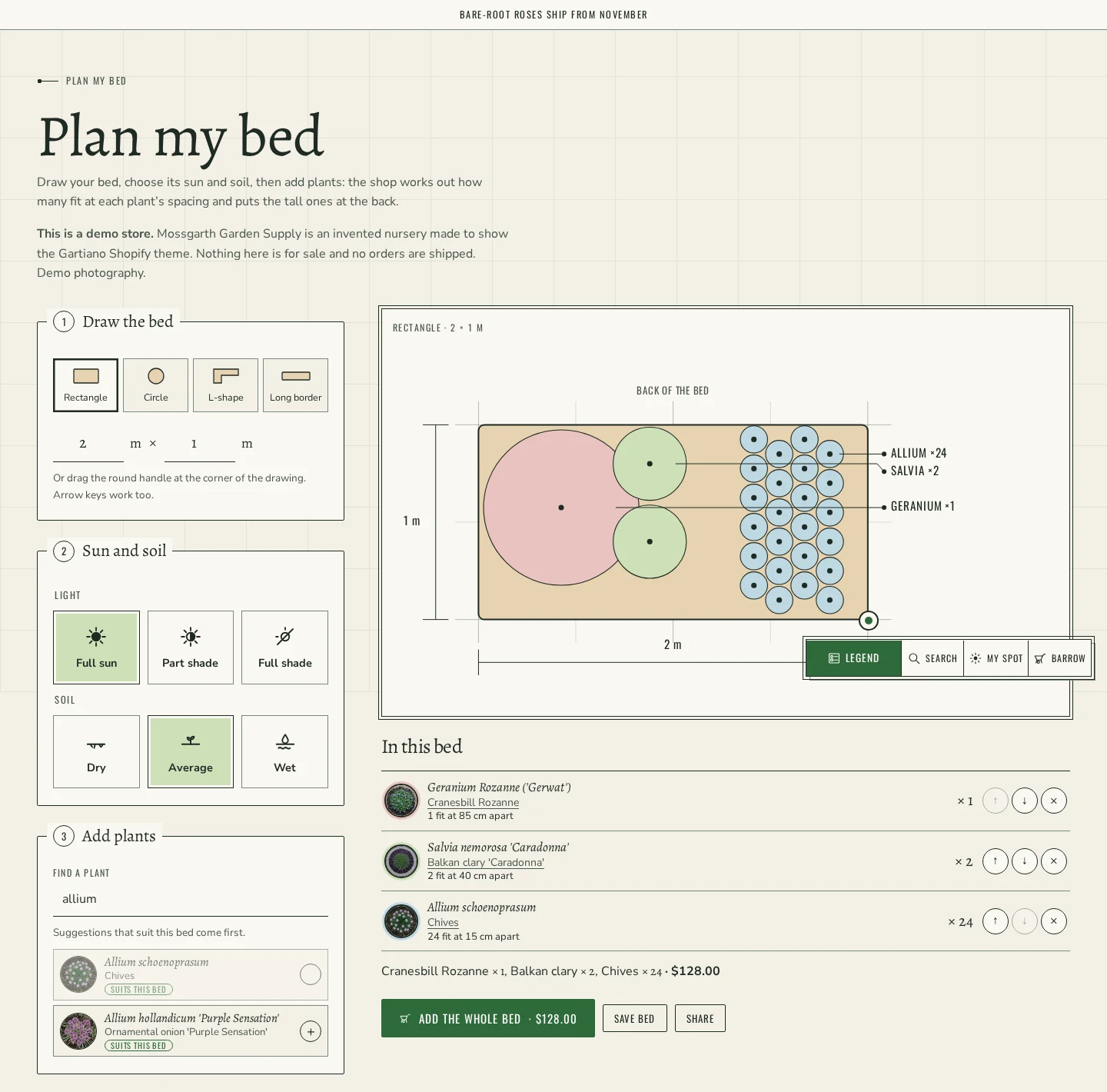
The signature is Plan My Bed. Shoppers draw their bed (rectangle, circle, L-shape or long border), type its size or drag the corner handle, pick its sun and soil, and add plants. The page works out how many of each plant fit at its planting distance, draws them in the bed with the tall ones at the back, warns when a plant does not suit the bed's sun or soil, and adds the whole bed to the cart in one click.
What you get
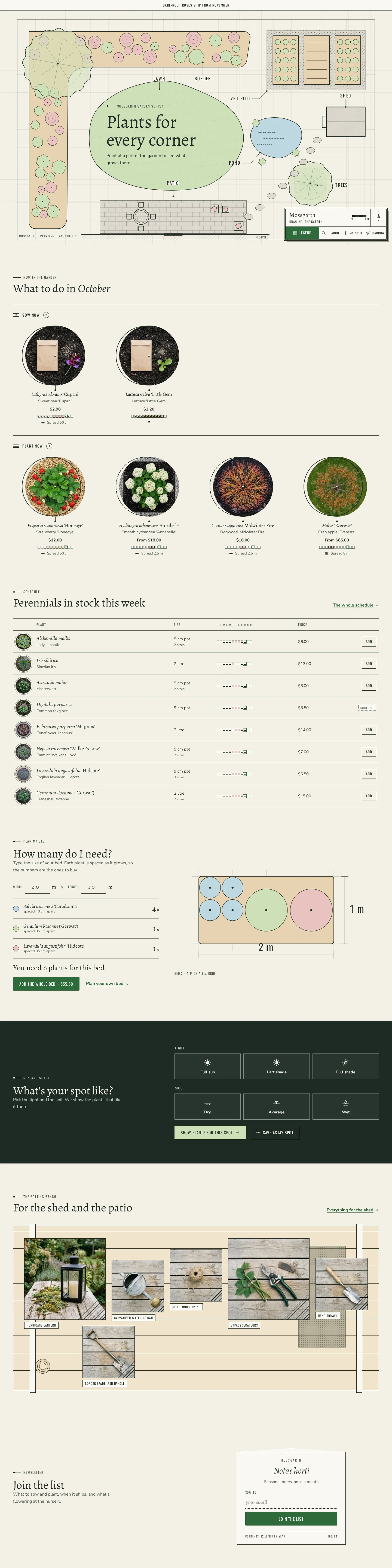
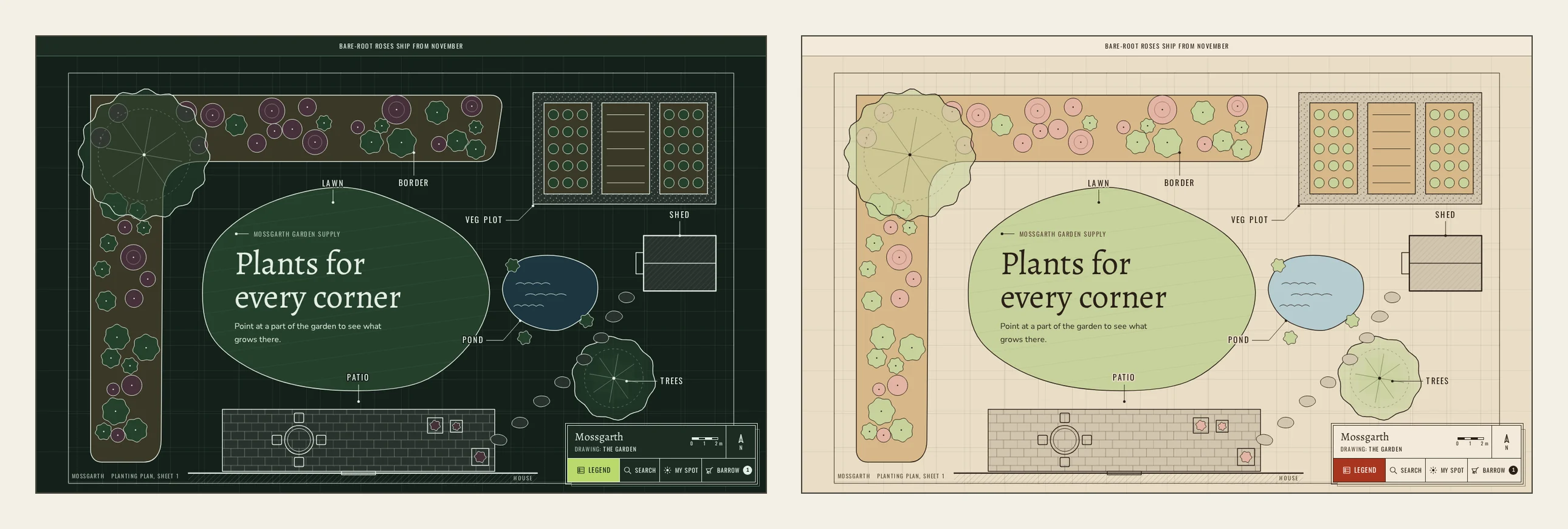
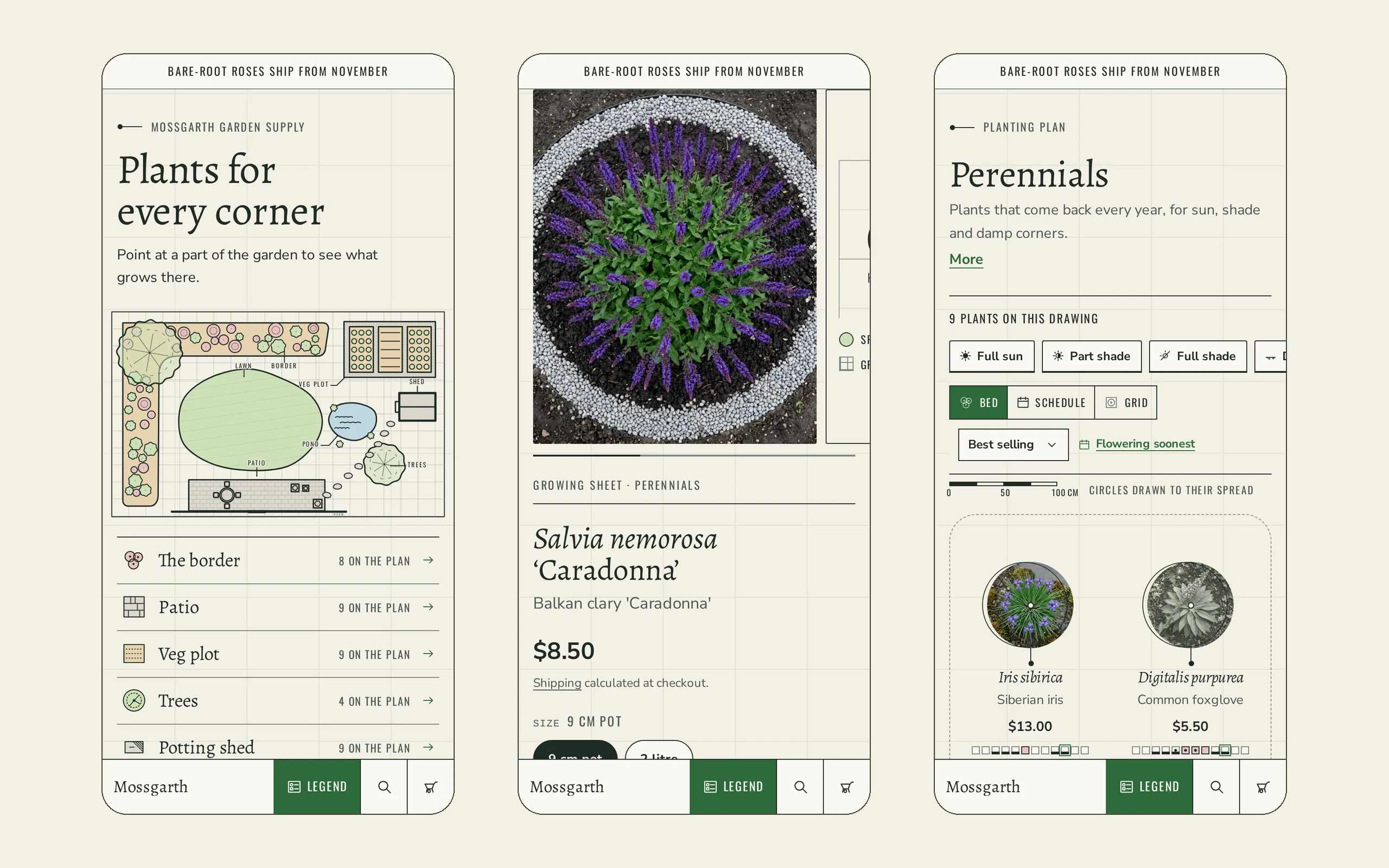
Top-down garden plan home page: a drawn plan with a border, lawn, patio, veg plot, pond and trees. Each area of the plan opens the products that belong to it. Choose one of six drawn layouts (cottage garden, courtyard, family garden, veg garden, balcony, front garden) or upload your own illustrated plan, and link each area to a collection in the theme editor.
The title block: like the corner of a real garden drawing, with your store name, drawing name, scale bar and north arrow. It holds Legend, Search, My Spot and the Barrow (cart). On phones it becomes a bottom strip. You choose whether it shrinks, hides or stays put while shoppers scroll.
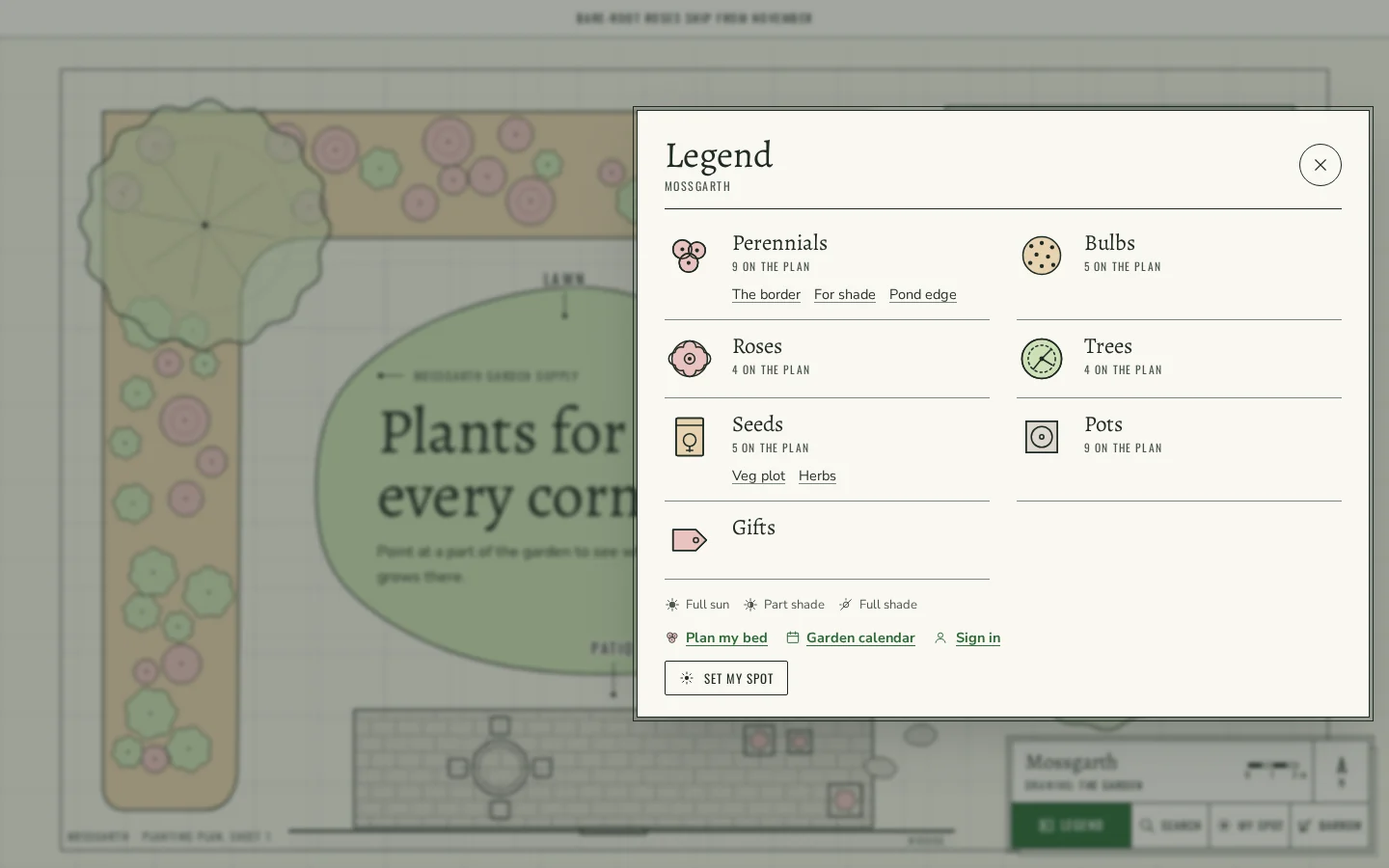
The Legend: a drawer of plan symbols (perennials, bulbs, roses, trees, seeds, pots, gifts) with how many of each are on the plan, plus links to Plan My Bed and the Garden calendar.
Plan My Bed: the bed planner described above, on its own page. Shoppers can save up to six beds in their browser, see them on their account page, and share a bed as a link.
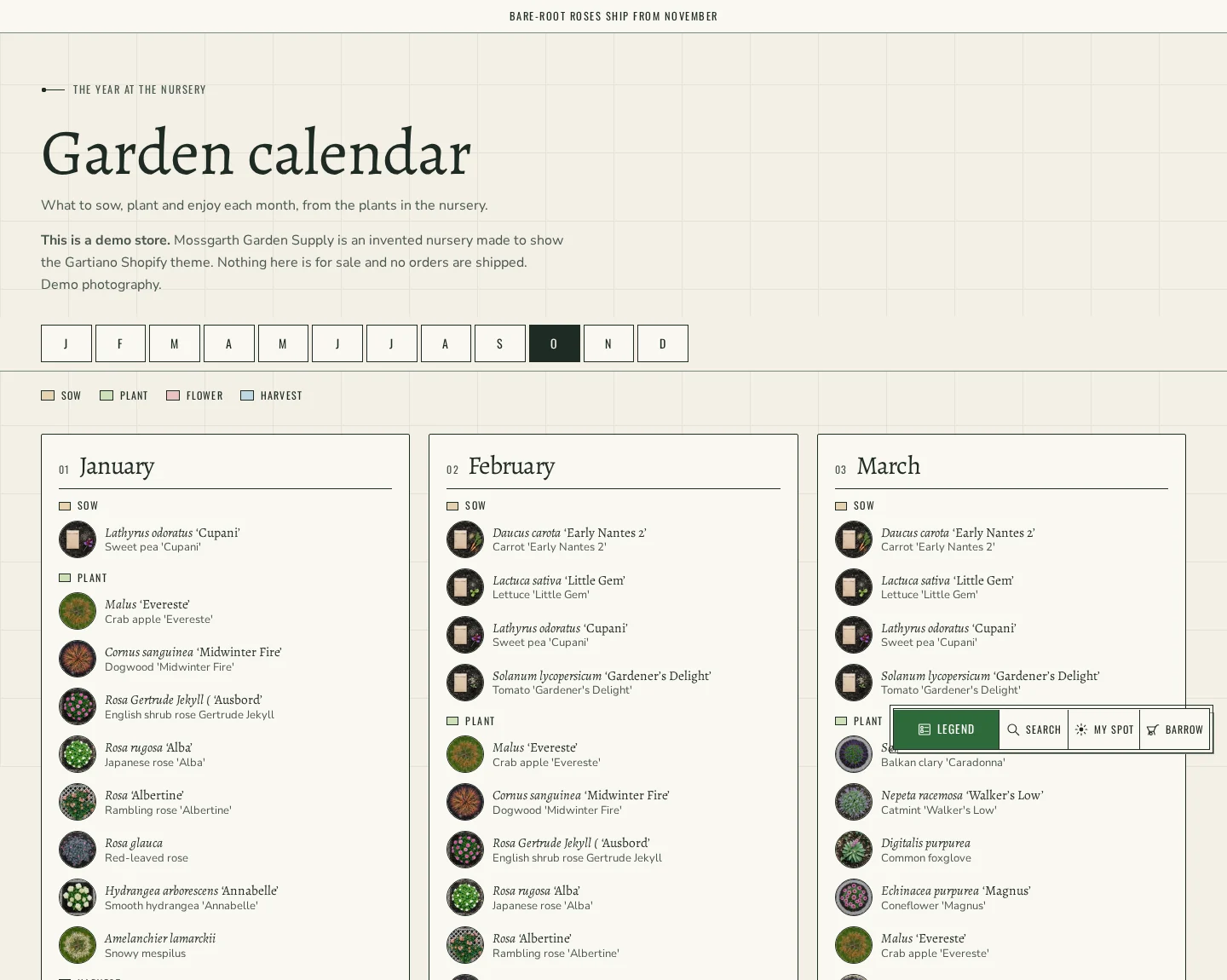
Garden calendar: a page with all twelve months showing what to sow, plant, enjoy in flower and harvest, built from your products' month data. The home page has a "What to do in <month>" section with Sow now and Plant now, and a schedule table of plants in stock this week.
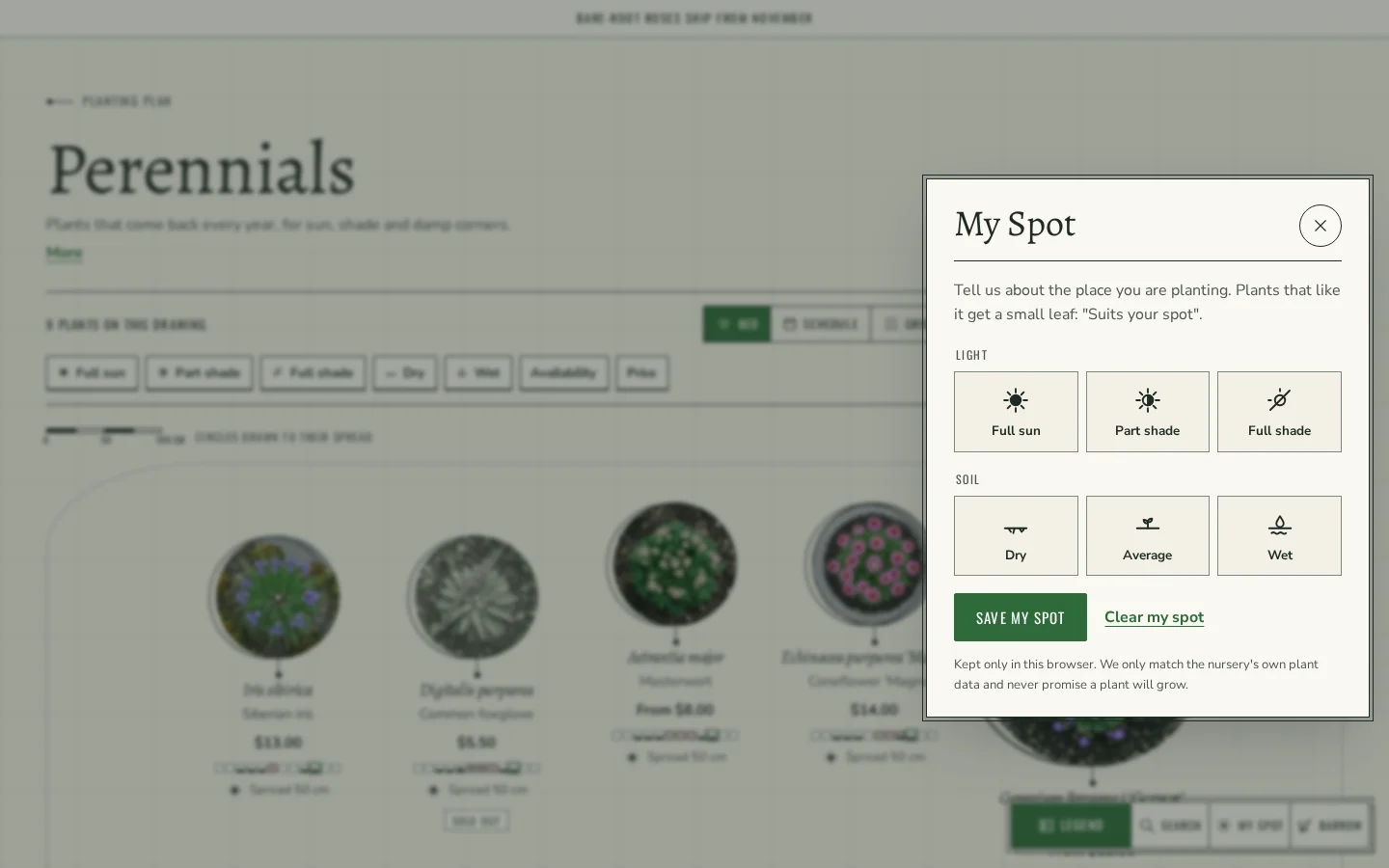
Suits my spot: shoppers tell the store about their spot once (full sun, part shade or full shade; dry, average or wet soil). It is kept in their browser, and every plant that matches gets a small "Suits your spot" mark on collection pages, search and Plan My Bed. A Sun and Shade section on the home page asks the same question.
02 Try before you buy
Live demo
The real theme, running. Switch devices to see every breakpoint.
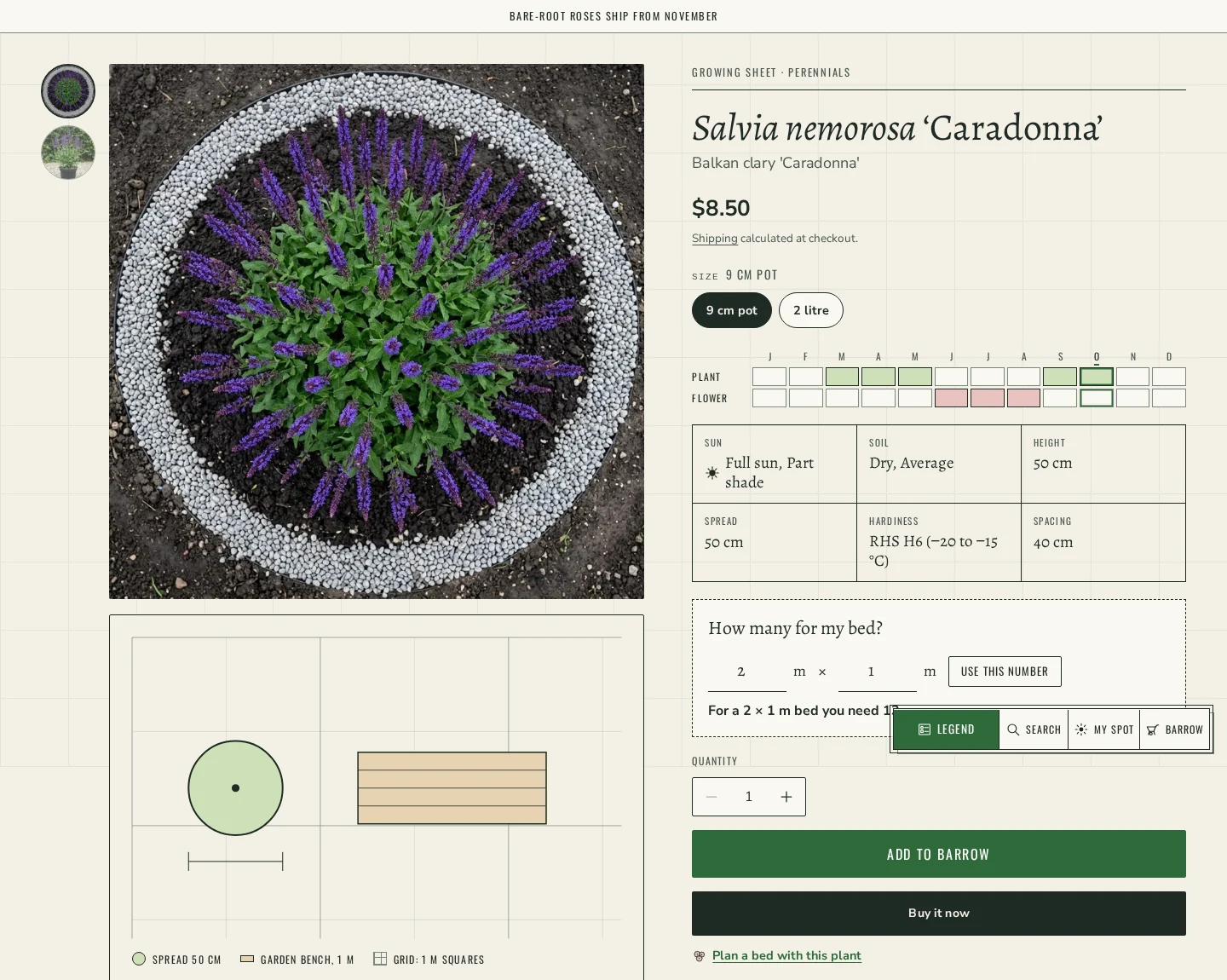
Growing Sheet product pages: a month strip for planting and flowering, a facts table (sun, soil, height, spread, hardiness, planting distance), "How many for my bed?" for a typed bed size, a plan drawing of the plant's spread next to a garden bench for scale, when it ships (with a pre-order button for bare-root plants), a Planted with ring of companions, You may also like, image zoom and a sticky add bar on phones. Pots and tools get a spec sheet with material and weather facts instead.
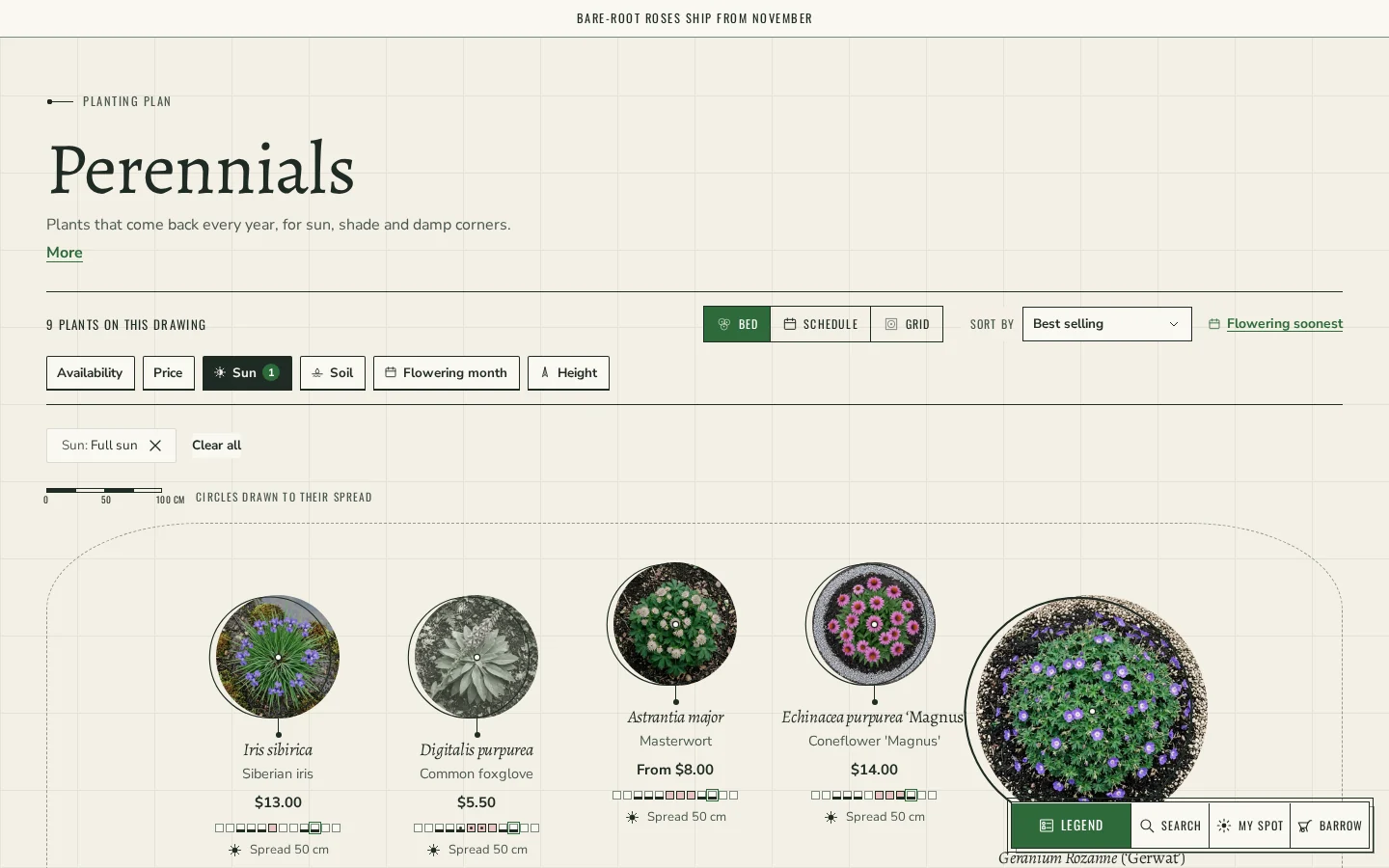
Collection and search pages: three views (Bed, with plants drawn to their spread; Schedule, a table with month strips; and Grid), a Flowering soonest sort, quick Sun and Soil tabs, and Shopify Search & Discovery filters drawn as tabs.
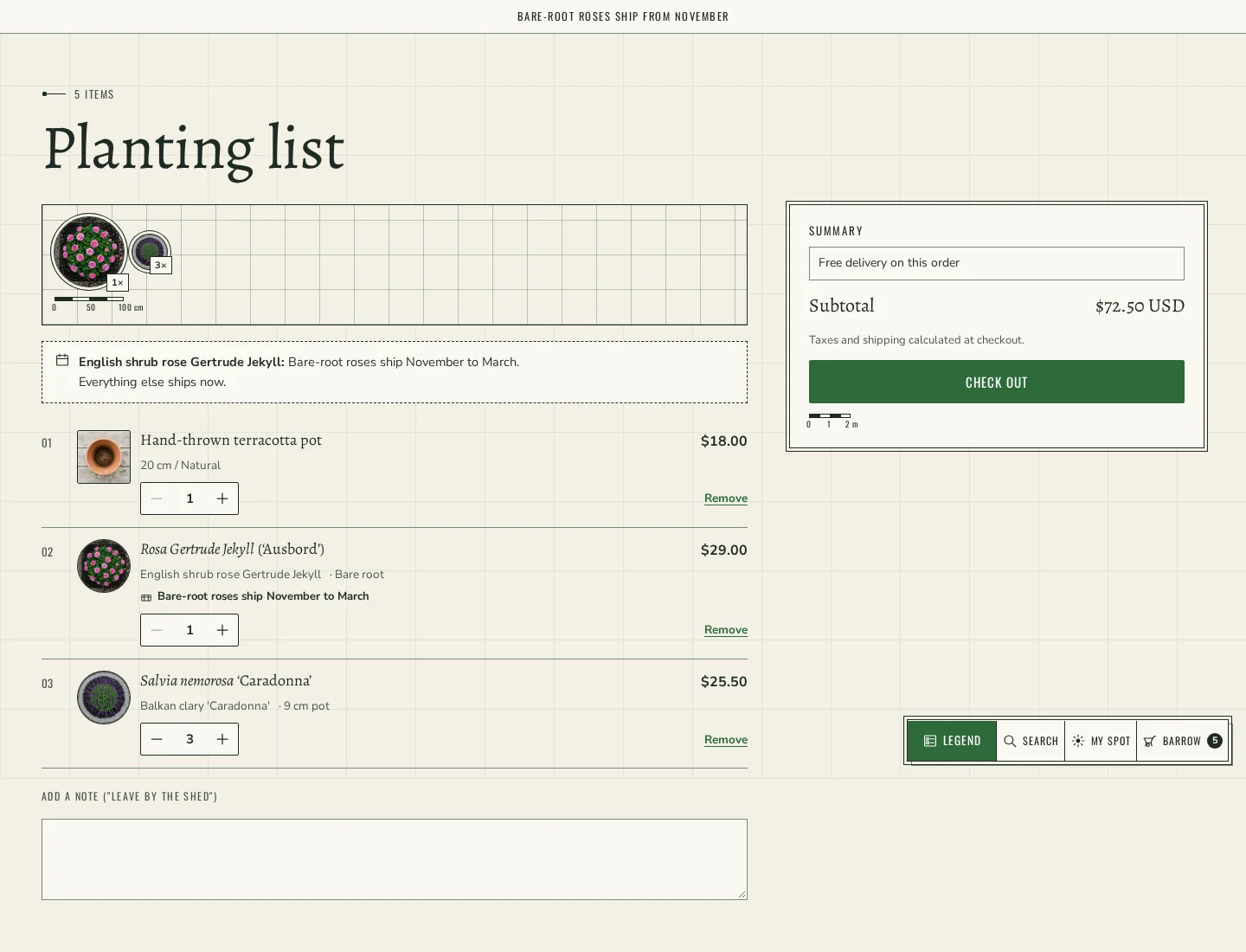
The Planting List: the cart drawer and cart page as a planting list with a small plan strip, when each item ships, a free-delivery line when you set an amount, an order note and cart recommendations.
More sections: the Potting Bench for hard goods, a Join the list seed packet for the newsletter, and a Plan My Bed teaser on the home page.
Every page in the same look: search with predictive results, 404, all collections, blog and article (with the plants from a note drawn in its margin), page, contact, password, a gift card as a seed packet, and the classic customer account pages (login, register, account, order, addresses, activate, reset), where orders read as planting lists and the account shows My Spot and saved beds.
Presets: Gartiano (light vellum, the default), Glasshouse (dark) and Allotment (warm kraft with a red accent). Text in all three meets a 4.5:1 contrast ratio. Metric or imperial sizes and the northern or southern hemisphere are theme settings.
Online Store 2.0: JSON templates, header and footer section groups, app blocks, predictive search and Search & Discovery filters.
Setup notes
Plant data lives in product metafields in the gartiano namespace (Settings > Custom data > Products). All of them are optional: every block that reads one hides when it is empty, and nothing is guessed.
The main ones: botanical (botanical name), sow, plant, flower and harvest (lists of month numbers 1 to 12), sun (list of text: Full sun, Part shade, Full shade), soil (list of text: Dry, Average, Wet), height, spread and spacing (dimensions; spacing drives "How many for my bed?" and Plan My Bed), pack_size for bulbs and plugs sold in packs, hardiness, ships and ship_months (when it ships and the pre-order button), coverage for seed packets, companions (Planted with), care, and width, material and weather for pots and tools.
Filters: Search & Discovery cannot filter on lists of numbers or on dimensions, so two extra fields are used only for filtering. flower_month is a list of single line text with the choices January to December (the same months as flower); add it as the "Flowering month" filter. height_band is single line text with the choices Under 60 cm, 60 to 120 cm and Over 120 cm; add it as the "Height" filter. Turn on storefront filtering for sun, soil, flower_month and height_band, then add Sun, Soil, Flowering month and Height in Search & Discovery > Filters. Without the app, the theme still shows its quick Sun and Soil tabs.
Plan My Bed and the Garden calendar use the page templates page.plan-my-bed and page.garden-calendar; pick those pages in Theme settings > My Spot. Product types that count as plants are set in Theme settings > Plants and units. Tags new, bare-root and pre-order add labels.
Blog posts can use gartiano.months and gartiano.products for a season strip and the plants drawn in the margin.
Good to know
The live demo store is password protected. Storefront password: mystore123.
The demo brand, Mossgarth Garden Supply, is invented, and the demo product photos are AI-generated. The growing facts in the demo were checked against a public horticultural source, but nothing in the demo is for sale.
Demo products and photos are not included in the ZIP. The theme installs with sample text and placeholders that you replace in the theme editor.
Gartiano is sold as a Shopify theme. HTML, WooCommerce and BigCommerce versions can be made to order from this page.
Licence: one purchase covers one store. You activate your licence key in Theme settings → License.
What buying Gartiano from Orbital includes, compared with a typical theme marketplace
Topic
Typical marketplace
Gartiano on Orbital
Price
One price, platform picked later
From $299, per platform, paid once
Support
Commonly a few months, extensions extra
3 months included
Updates
Depends on the author
Free for life
Licence
Several tiers
One store or website per purchase
Reviews
Ratings from anyone with an account
Verified buyers only
Presets & styles
Gartiano
Light vellum with green ink, set in Alegreya, Nunito Sans and Oswald plan labels. The default.
Glasshouse
A dark plan on deep green, like a drawing on a glasshouse wall.
Allotment
Warm kraft paper with a red accent.
04
Features
Included9
AA contrast colour schemes
Cart drawer
Cart recommendations
Collection filters
Image zoom
Online Store 2.0
Predictive search
Quick add
Sticky add to cart
Speed & accessibility
Scores are published after we measure the live demo. We never show estimates.
3 months from purchase · replies within 3 business days
Licence
One store or website per purchase, activated with your licence key
Shopify
v1.0.0
Requirements
Shopify Online Store 2.0 (JSON templates, section groups, app blocks)
Upload the ZIP in Online Store > Themes > Add theme > Upload zip file
Fonts come from the Shopify font library, so nothing extra to host
Plant features read gartiano.* product metafields (all optional); see the setup notes
Filters need Shopify Search & Discovery (Flowering month and Height use the text fields flower_month and height_band)
In the ZIP
layout/ · theme.liquid and password.liquid
templates/ · JSON templates for every page type (Online Store 2.0), the Plan My Bed and Garden calendar page templates, the classic customer account pages and the gift card template
sections/ · All sections, including the garden plan, Now in the garden, Schedule, Plan My Bed, Sun and Shade, Potting Bench, Join the list, Garden calendar and the header and footer section groups
assets/ · Theme CSS and JavaScript (no jQuery, no external font hosting)
config/ · Theme settings schema and the Gartiano, Glasshouse and Allotment presets
locales/ · English storefront text and theme editor labels
Upload the ZIP in Online Store → Themes → Add theme.
06
What's new · Changelog
v1.0.0Shopify ·
First release.
07
Support, licence & refunds
01
One licence, one site
Each purchase covers one store or website on the platform you chose. You activate it by pasting your licence key in the theme settings; the theme registers your live store's address by itself. Unactivated copies show a notice and don't receive updates or support.
02
3 months of support
Support runs for 3 months from the purchase date; the end date is shown in your account. Updates stay free for life, so fixes keep coming after support ends.
03
No refunds, we fix it
Because themes are digital downloads we don't offer refunds. If something doesn't work as described, contact us and we'll fix it. Please try the live demo before buying.
No reviews yet. Only people who bought Gartiano can leave a review, so every rating here comes from a real purchase.
09
FAQ
01Does Gartiano work with Online Store 2.0 and apps?
Yes. Every page uses JSON templates, the header and footer are section groups, and the product, cart and article sections accept app blocks.
02How does Plan My Bed work out how many plants to buy?
Each plant's planting distance comes from the gartiano.spacing metafield. Plan My Bed gives each plant a share of the bed, counts how many fit at that distance and draws them, tall plants at the back. A plant without a spacing can still be added with a typed quantity.
03Do I have to fill in plant data for every product?
No. All gartiano.* metafields are optional. A block whose data is empty is hidden, so a product without plant data shows a normal product page. Pots and tools use a spec sheet with material and weather facts instead.
04Which filters does it support?
All filters from Shopify's Search & Discovery app, drawn as tabs, plus the theme's quick Sun and Soil tabs and the Flowering soonest sort. For Flowering month and Height, add the text fields gartiano.flower_month (choices January to December) and gartiano.height_band (Under 60 cm, 60 to 120 cm, Over 120 cm), because Search & Discovery cannot filter on lists of numbers or dimensions. The setup notes above list every field.
05What is Suits my spot?
Shoppers pick their light (full sun, part shade, full shade) and soil (dry, average, wet) once. It is kept in their browser, and plants whose sun and soil fields match get a "Suits your spot" mark on collections, search and Plan My Bed.
06Does it work for the southern hemisphere or in feet and inches?
Yes. Choose the southern hemisphere in Theme settings > Plants and units and "What to do in <month>" and the current-month marker shift by six months to follow your seasons. Sizes can show in centimetres and metres or in inches and feet.
07What is the password for the live demo?
The demo store is password protected. Use mystore123 on the storefront password page. The demo brand is invented and nothing in it is for sale.
08How many stores can I use it on?
One purchase covers one store. Paste your licence key in Theme settings → License; it activates on your live store's domain. Buy another licence for each additional store.
09Is there an HTML or WooCommerce version?
Gartiano is sold as a Shopify theme. HTML, WooCommerce and BigCommerce versions can be made to order from the theme page; they are built after payment and delivered to your Orbital account.